A quick story
Back in 2011, a cousin of mine told me something that stuck.
She said she needed “an algorithm that fetches results from competitors.”
At the time, I had no idea what she really meant.
It sounded abstract—almost like something out of a machine learning paper.
It wasn’t. She was talking about web scraping.
And funny enough, that simple conversation stuck with me. Years later, I found myself doing exactly that… just at a much more painful level than I expected.
The “Classic” Approach: Python + Selenium
Like most developers, I started the hard way—Python + Selenium, manually navigating DOMs, dealing with dynamic content, and fighting anti-bot mechanisms like it was a full-time job.
And honestly… it works. But it’s painful.
If you’ve ever scraped a modern website, you probably wrote something like this:
driver = webdriver.Chrome(service = Service(ChromeDriverManager().install()))
driver.get("https://example.com")
time.sleep(3)
products = driver.find_elements(By.CLASS_NAME, "product-card")
for product in products:
    name = product.find_element(By.CLASS_NAME, "product-name").text
price = product.find_element(By.CLASS_NAME, "product-price").text
print(name, price)
driver.quit()
Sounds simple, right?
Now add:
- Lazy loading
- Infinite scroll
- Bot detection
- CAPTCHA
- IP blocking
- Dynamic class names
- Broken selectors every other deploy
- Hell
Suddenly your “script” becomes a maintenance nightmare.
And that’s when I realized:
Scraping isn’t hard… scaling scraping is.
Enter ScrapingBee
After fighting with Selenium long enough, I switched to ScrapingBee.
And honestly—it felt like cheating.
Why?
Because ScrapingBee handles:
- Headless browsers
- Proxy rotation
- JavaScript rendering
- Retries & reliability
…all behind a simple API.
ScrapingBee API (Node.js example)
Here’s how I use it with Node.js:
const rp = require('request-promise');
const options = {
    uri: 'https://app.scrapingbee.com/api/v1',
    qs: {
        api_key: 'YOUR_API_KEY',
        url: 'https://example.com',
        render_js: true
    },
    json: true
};
rp(options)
    .then(function(data) {
        console.log(data);
    })
    .catch(function(err) {
        console.error(err);
    });
That’s it.
No browser setup.
No driver issues.
No “why did Chrome crash again?”
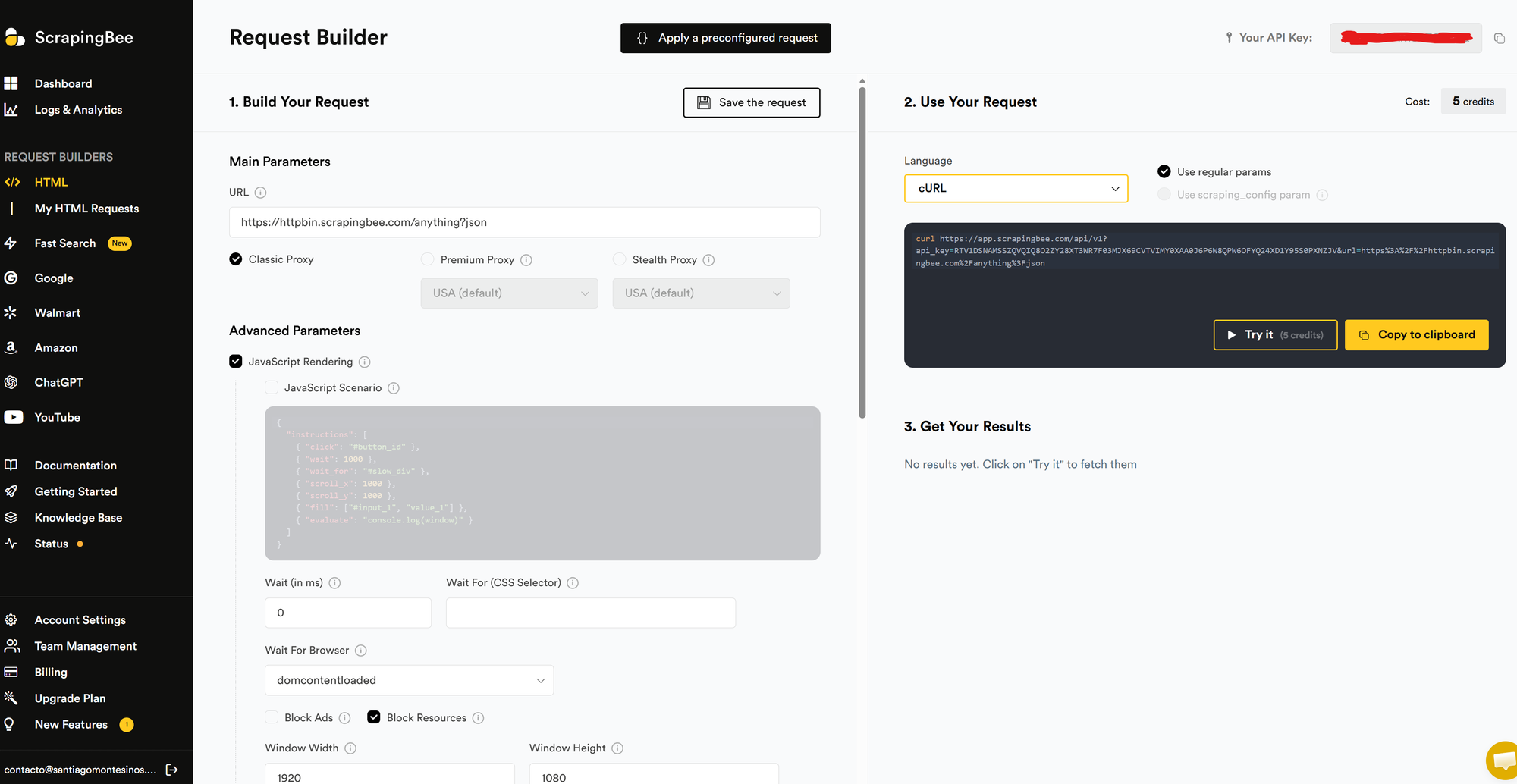
What I really like: the Web Interface
ScrapingBee isn’t just API-first—they also have a web interface that lets you:
- Test requests instantly
- Toggle JS rendering
- Debug responses visually
- Iterate faster without touching code
It’s one of those underrated features that saves hours.
For a single URL scraping, it's a game changer.
Language Compatibility
Even though I used Node.js, ScrapingBee works with basically anything:
- Python (
requests) - JavaScript / Node.js
- PHP
- Ruby
- Java
- cURL (for quick testing)
If your language can make an HTTP request, you’re good.
A quick note on AI scraping
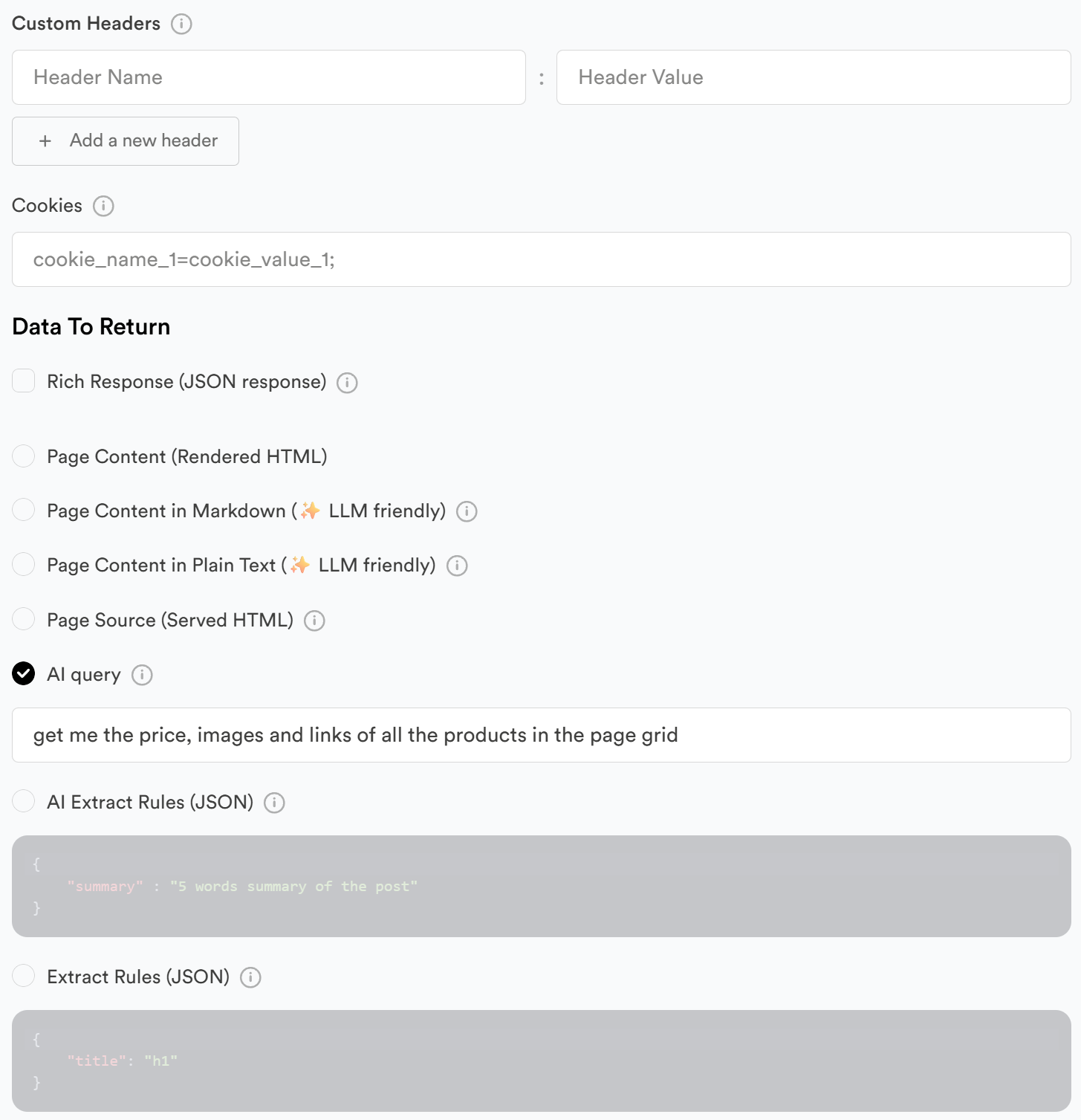
One thing worth mentioning: ScrapingBee is also moving into AI-powered scraping.
Instead of relying purely on selectors (which break all the time), you can start extracting data more semantically—think:
- “Get me product name, price, and availability”
- Instead of:
.product-card > div:nth-child(2) > span
This is a big shift.
It reduces:
- Selector fragility
- Maintenance overhead
- Time spent debugging DOM changes
It’s not perfect yet (no AI extraction tool is), but it’s clear where things are going:
From “scrape the DOM” → to “extract the data”
And honestly, after years of fighting CSS selectors… this is a very welcome evolution.
ScrapingBee vs Thunderbit
Let’s talk about the elephant in the room.
Thunderbit
Thunderbit is a solid tool. No question.
It’s:
- Easy to use
- UI-driven
- Great for non-technical users
But…
It’s expensive for what it does. Unfairly expensive. And that’s where it starts to feel… off.
ScrapingBee
ScrapingBee is:
- Developer-first
- API-driven
- Transparent
- Predictable in pricing
Most importantly:
It scales without punishing you financially.
You’re paying for:
- Requests
- Rendering
- Infrastructure
Not for “UI convenience markup”.
Cost Reality
This is where ScrapingBee wins, hard.
- Thunderbit → Feels like SaaS pricing with heavy margins
- ScrapingBee → Feels like infrastructure pricing (fair, scalable)
If you're running scraping at scale, that difference becomes very real, very fast.
Why I Moved Away From DIY Scraping
After doing Selenium for a while, I realized:
I wasn’t building a product.
I was maintaining a fragile scraping engine.
And that’s not where you want your time to go.
| Approach | Pros | Cons |
|---|---|---|
| Selenium | Full control | High maintenance, fragile |
| Thunderbit | Easy UI | Expensive, less flexible |
| ScrapingBee | Scalable, reliable, API | Requires dev mindset |
Final Thought
Scraping is one of those things that looks easy until it isn’t.
You can absolutely build everything yourself…
But you’ll pay in:
- Time
- Stability
- Sanity
For me, switching to ScrapingBee wasn’t about convenience.
It was about focus.
Focus on extracting value from data—not fighting the infrastructure behind it.
If you're still running Selenium scripts in production…
you might be closer to switching than you think.